Registers & safeguarding
Know who’s in the hall.
The register opens on the phone in your pocket: one tap per child, medical notes and emergency contacts on the same row, and a paper copy for the week the signal lets you down.
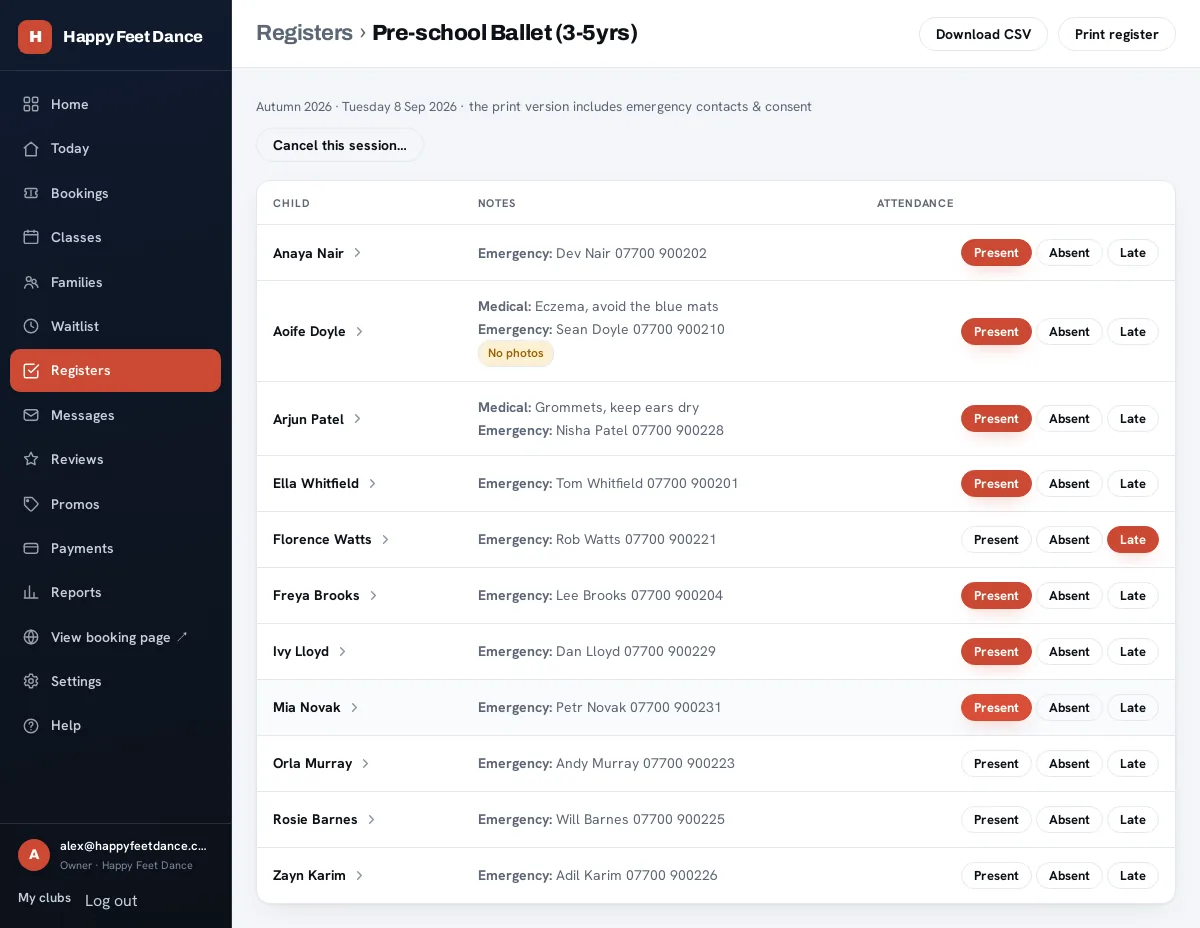
The real screen, with a demo club’s data.
Taking the register
One screen, and the child in front of you
Present, Late or Absent, one tap each, saved as you go and stamped with who marked it. Allergies and emergency contacts sit on the child’s row rather than three screens away.
Tap a name and you get the adult who booked them, with the number as a tap-to-call link: the child nobody has collected is a phone call, not a search. If the session can’t run at all, cancelling it emails every family on the roster.
The paper register
Print it before you go
A sports hall basement is a poor place to discover your software wants four bars. Printing gives you a proper A4 register: your club, the class, the venue, the date and the time it was generated.
Every child gets a row with their emergency contact, their medical information and a box to tick. Or take the CSV, which adds date of birth, booking type, parent phone and email, photo consent and whatever attendance has already been marked.
There is no offline mode. The register is a web page and it needs a connection to save a mark. If your venue has no signal, print before you go; that is what the paper register is for.
Safeguarding
Consent, done properly
Children’s medical details are special category data, so they are treated like it. The first time a family books with you, the parent approves exactly what your club receives, field by field, with the reason for each one.
Your register then reads the family’s profile rather than a copy taken at booking, so an allergy added on Tuesday is on your Saturday register. Withdrawing is one action from the parent’s account, and every grant and withdrawal is kept in a ledger that is never deleted.
Withdrawal keeps your attendance and enrolment records, including the child’s name, because safeguarding requires it. Medical details and contacts are deleted 90 days after withdrawal.
Access
The coach doesn’t need your bank details
A coach account opens Today and Registers and marks attendance. Classes, families, waiting lists, messages, payments and settings are closed to it, so a Saturday coach can have a login without having your business.
Staff run the day to day. Owners get the business surfaces: payments, reports, settings, billing and the staff list itself.
| Area | Coach | Staff | Owner |
|---|---|---|---|
| Today & registers | ✓ | ✓ | ✓ |
| Classes & bookings | – | ✓ | ✓ |
| Families & messages | – | ✓ | ✓ |
| Payments & reports | – | – | ✓ |
| Settings & staff | – | – | ✓ |
Reporting
Attendance, after the fact
The rate per class over 30 days, 90 days, a year, or dates you pick, so the class that is quietly emptying shows up before the term does.
With honest maths: a session where nobody took the register counts as unmarked, not as a hall full of absent children, and the report tells you how many registers were actually taken so you know how much to trust the number.
Fair questions
Does the register work without a signal?
No. It is a web page and it needs a connection to save a mark. For a venue with no signal, print the A4 register before you go: it carries the emergency contacts, the medical information and a box to tick.
Can a coach see our payments?
No. A coach account opens Today and Registers and marks attendance. Classes, families, waiting lists, messages, payments and settings are closed to it.
Who can see a child's medical notes?
The staff of the club the family booked with, on that club's register. The parent approves those fields for your club specifically, sees the list of what each club receives, and can withdraw it from their account.
What happens when a parent withdraws sharing?
You are told, and current bookings run to the end of their term. You keep attendance and enrolment records including the child's name, because safeguarding requires it; medical details and contacts come off after the grace period.
Can we still keep our own paper records?
Yes. Print the register, or download the session as a CSV with the roster, contacts, consent and attendance in it.
Your next session, on a register that knows the children.
Set your club up, publish a class, and take the register on your phone this weekend.