Your booking page
A booking page that looks like your club.
Your colours, your photos and your own web address, live the moment you sign up. Parents book and pay on it, and you never open a website builder.
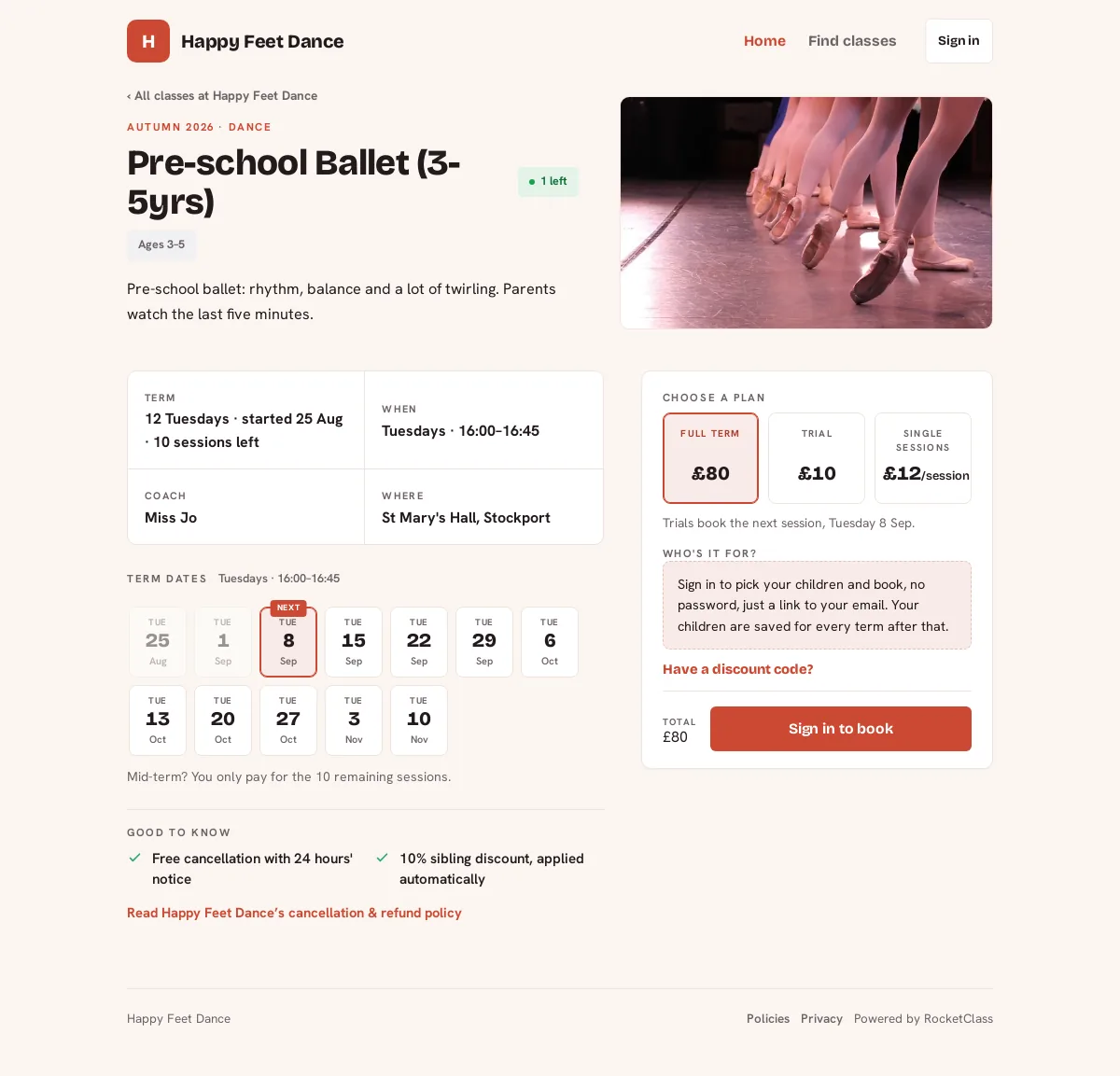
One club’s page, with its own brand colour, its classes and what each one costs.
Your own address
Live before you have written a word
yourclub.rocketclass.co.uk exists from the moment you sign up, ready for a flyer or a Facebook post. Prefer book.yourclub.co.uk? That can point at the same page; tell us and we’ll set it up.
Pick a brand colour, upload a logo, and the page, the booking flow and the emails parents receive all follow it. The timetable, the prices and the hours come from the classes you have created, so the page is real on day one and the photos and the words about the club can wait until you have ten spare minutes.
Booking
What a parent actually does on it
Spaces are live per class, so a full class offers the waiting list instead of taking a booking you would have to unpick. They book a term, a taster, single dates or a camp week, with your sibling discount and any promo code applied at checkout.
They pay by card into your own Stripe account and the child lands on your register. Your cancellation window, refunds, instalments and pro-rata rules are published as a policies page written from your settings, so what a parent reads and what the software enforces cannot drift apart.
Discoverability
Who can find it, and who can’t
Your classes appear in the RocketClass directory, where nearby families search by activity, age and day, and your club gets a profile with your reviews on it.
That is a per-class decision, not a switch for the whole club. Turn a class off the directory and it still sits on your own timetable and still takes bookings. Give one an access code and it is private to the parents you hand the code to, and never reaches the directory at all.
Only a parent who actually booked can leave a review, and you reply in your own words.
Your own site
Already have a website you like?
Keep it. Install RocketClass Events, paste the key from Settings › Integrations, and drop the shortcode on any page: your weekly classes, camps and one-off sessions appear on your own site with dates, prices and spaces left, and they stay up to date on their own. Not on WordPress? The same list comes as an HTML snippet.
Nothing is booked on your website. Every card links through to your RocketClass page, so capacity, payments, waiting lists and registers stay in one system, which is the difference between an embed and a second inbox.
[rocketclass_events limit="4"]
Fair questions
Do I have to build a website?
No. The page exists from the moment you sign up and fills itself in from the classes you create. Photos, a few lines about the club and your location are optional extras you can add later.
Can I use my own domain?
Yes. You get yourclub.rocketclass.co.uk immediately, and your own address (book.yourclub.co.uk, say) can point at the same page. Tell us and we will set it up.
Can I keep a class off the public directory?
Yes, class by class. An unlisted class still sits on your own timetable and still takes bookings. A class with an access code is private to the parents you give the code to and never reaches the directory at all.
Does the WordPress plugin take bookings on my site?
No, and that is deliberate. It shows your live classes with dates, prices and spaces left, and every card links through to your booking page, so capacity, payments and waiting lists stay in one system.
What if I am not on WordPress?
The same class list is available as an HTML snippet you can paste into another site builder.
Your page can exist this evening.
Sign up, add a class, and share the link. The rest of the page can wait until the weekend.